All your Moodle sites in one view.
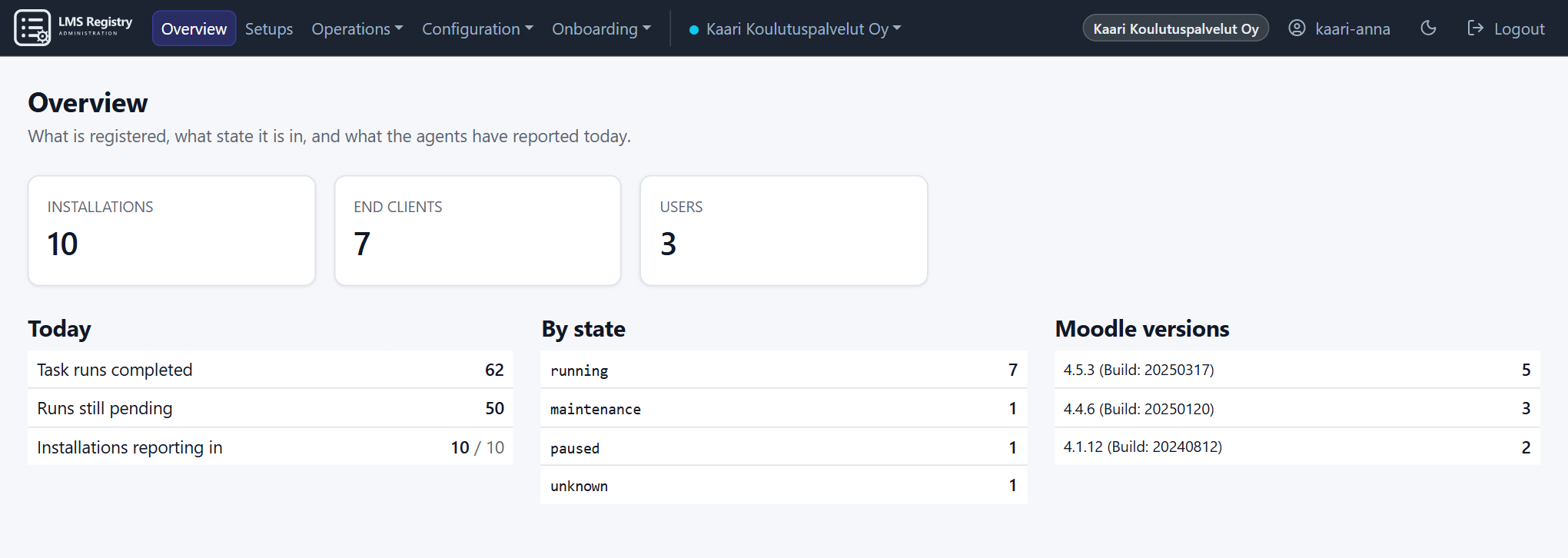
Manage collects versions, plugins, settings and usage from every Moodle you run, automatically. Changes are made centrally, and every one of them is logged.
One plugin goes into Moodle. Outbound access to the internet on port 443 (HTTPS) is all it needs. No inbound port is opened in your firewall.
Manage is a new service and is currently in beta and testing. At first, traffic to the service is allowed only from Finland and Sweden.
Moodle asks, the registry answers.
The agent installed in Moodle always opens the connection to the registry itself. It works behind a firewall, NAT or load balancer without a single open port. If Moodle goes down, it simply stops asking.
Outbound access on port 443 (HTTPS) is enough.
The agent registers with the LMS Registry. From then on, Moodle can be directed from Manage: collect statistics and run tasks. Everything travels over HTTPS connections that Moodle opens itself.
Install the plugin
The plugin installs like any other Moodle admin tool.
Add the key
Create an enrolment key in Manage and paste it into the plugin's settings. Moodle generates its own key pair and registers with the registry. An installation that is already registered can be claimed later with a claim code.
The agent fetches work
Moodle's cron asks for tasks every ten minutes, runs them and sends the results back.
See it in Manage
Versions, plugins, settings and usage appear on the installation's page and in the overview.
Three task types
adhoc
Runs as soon as the agent has fetched it, as a Moodle background task. Statistics, plugins and reading settings work this way.
scheduled
The plugin holds the task and runs it at exactly the agreed time, for example a settings change overnight in a maintenance window.
instant
Runs immediately in a direct call signed by the registry, and the result comes back in the same response. Maintenance mode is switched this way.
Complete management of your Moodle installations in one place.
Every installation in view
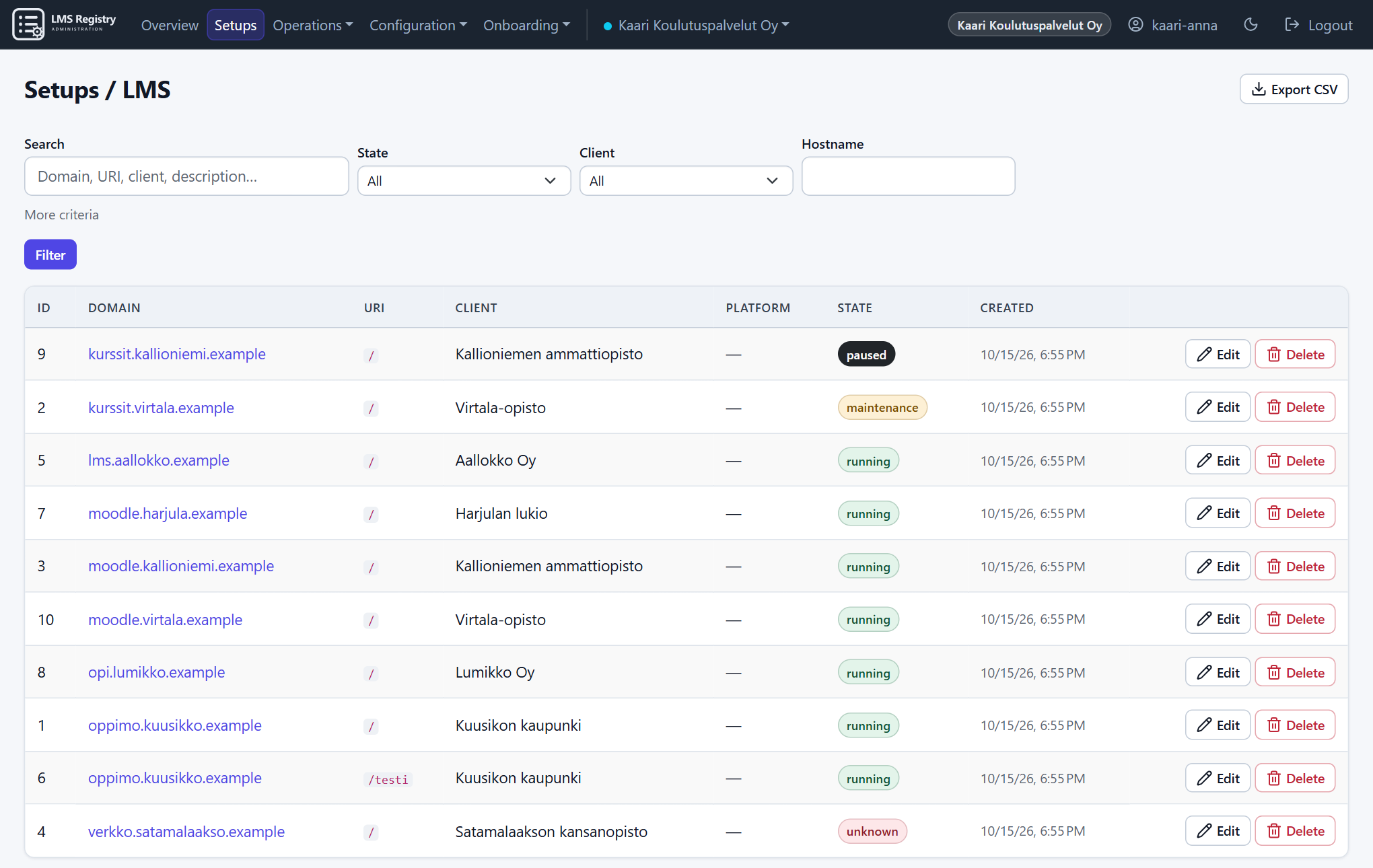
Each installation's state, Moodle and PHP version, plugins, servers, sign-in trends as charts and the users online now.
Search that finds risks
Which installations run an old Moodle, which are missing a plugin. Searches can be saved, and bulk actions run on what they find.
Agreed settings stay agreed
Baselines for the customer, an end client or a single installation. Manage shows which setting has drifted from what was agreed, and puts it back.
One setting on many Moodles at once
Pick installations with a search and set a Moodle core or plugin setting on all of them in one go. A task can be run, or a configuration set attached, the same way.
Maintenance at the press of a button
Put Moodle into maintenance mode with your own message. Manage changes the state only once Moodle has confirmed it.
Tasks and schedules
One-off and recurring tasks for installations. The result of every run is kept in the history.
Clients and contacts
End clients, their installations and their contact people, in the same registry as the installations.
Quick messages by email
Write to an installation's or client's contact person straight from its page, for example before a maintenance break. Messages go out through your own mail server, and replies come back to the sender.
Two-factor authentication
Sign-in with an authenticator app and recovery codes. An organisation can require it of all its users.
Access restrictions per organisation
Your administrator limits use of Manage to your own IP addresses or networks, per role if needed. The restriction applies to your organisation only.
Moodle Package Builderadd-on
Enabled separately. Built packages beside the installation: which version was built and which is installed. Download, and sign in to the Package Builder without a second password.
Reports and audit log
A PDF report per installation, CSV exports and an audit log of every administrative action.
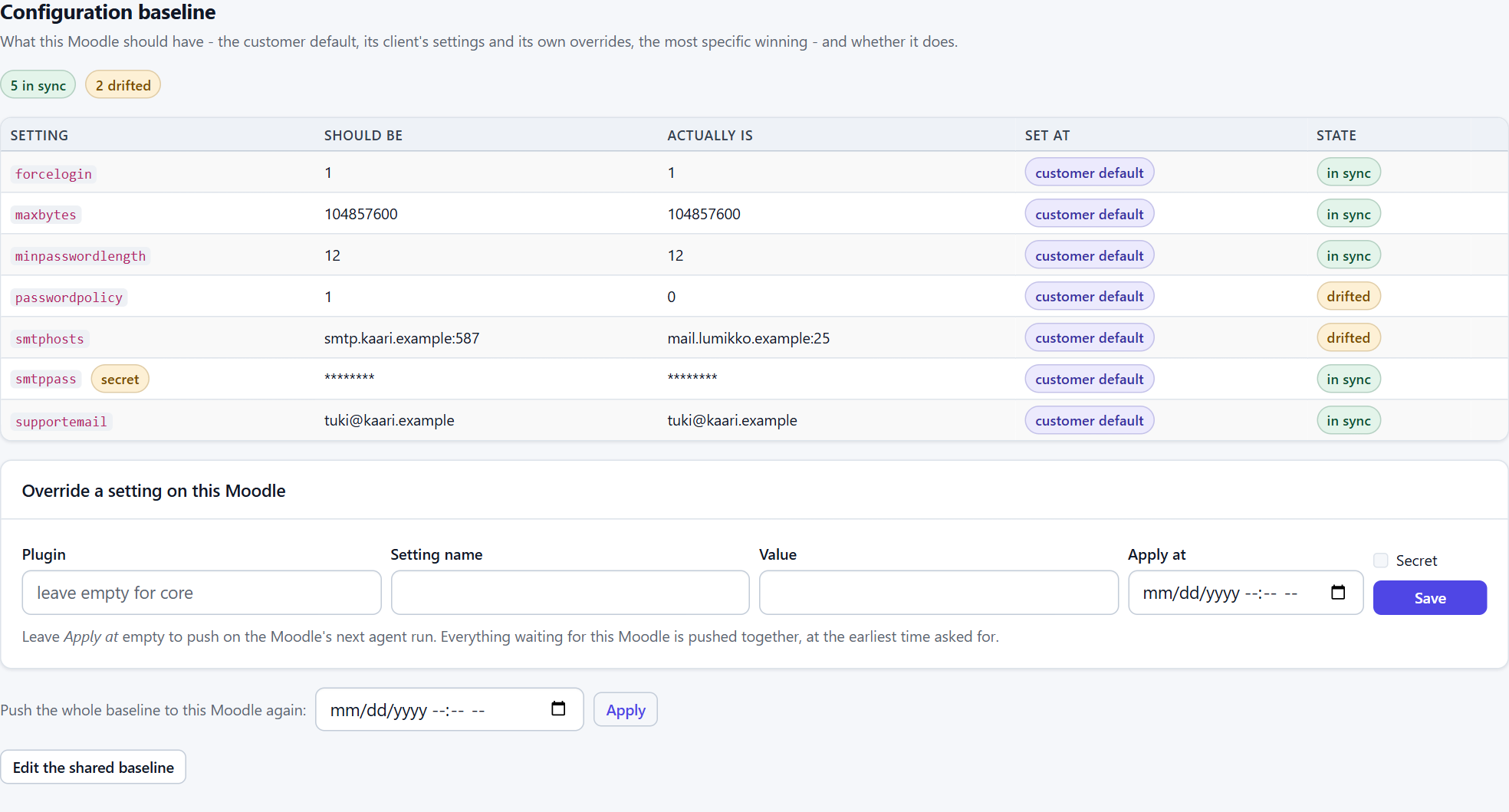
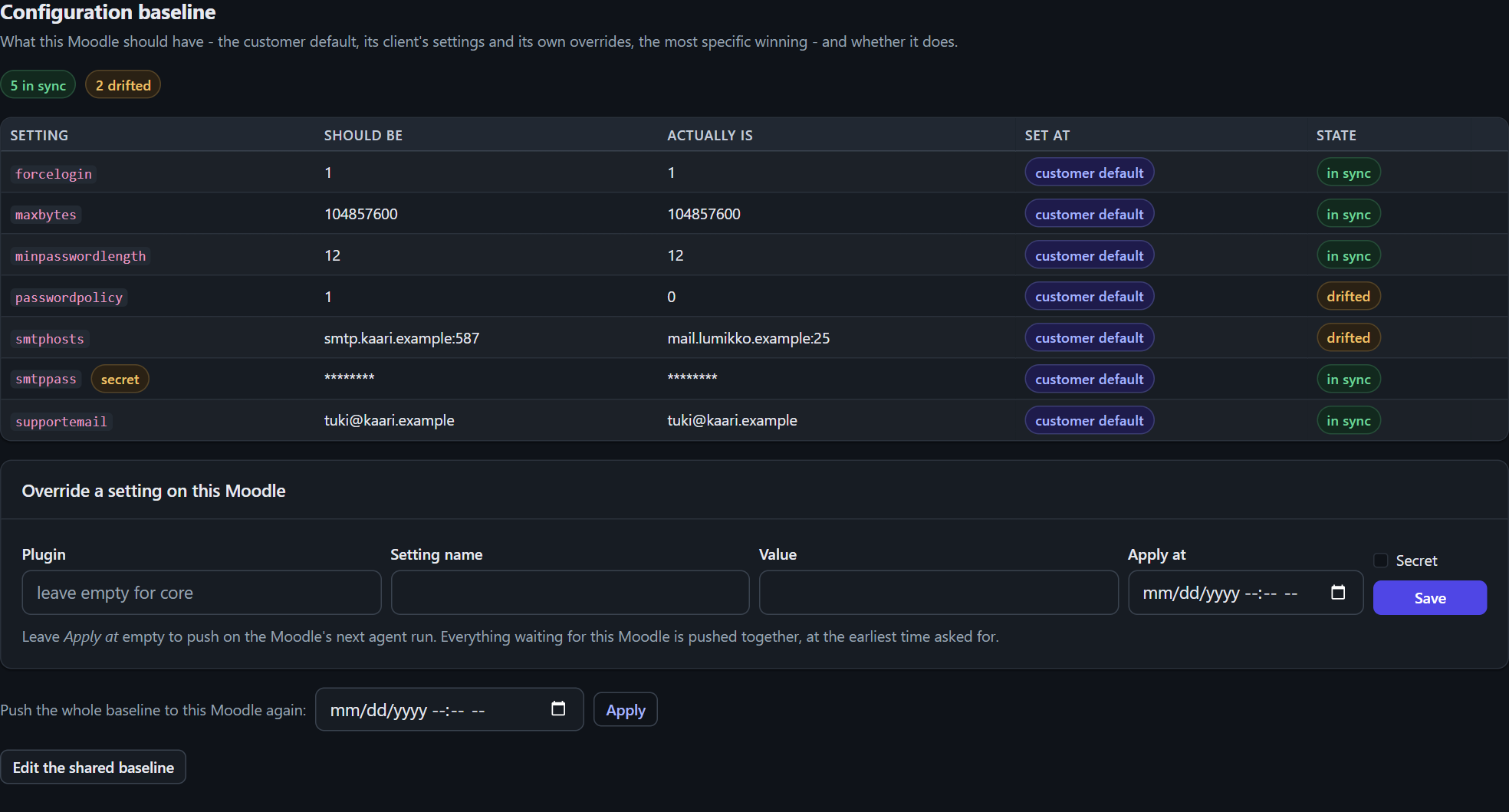
See the drift before it becomes a ticket.
A baseline sets the values every installation must have. The agent reports the actual values, and Manage shows the differences. Secrets are stored encrypted and shown to no one.
Seven named tasks. Nothing else.
The agent runs only the tasks written into the plugin. The registry cannot send it code or commands, only a request to run one of these.
| Task | What it does | Direction |
|---|---|---|
get_platform_info | Moodle and PHP version and basic server details | reads |
get_plugins | Installed plugins and their versions | reads |
get_basic_stats | Users signed in today and in the last 24 hours, file storage size | reads |
get_onlineusers | Number of users online now | reads |
get_configs | Current values of the settings the baseline covers | reads |
set_required_configs | Sets the values agreed in the baseline | writes |
set_maintenance | Maintenance mode on or off, immediately | writes |
Signed requests
Moodle signs every request with its own key, and the private key never leaves the server. A request is valid for five minutes, so a captured one cannot be replayed later.
No program paths
Settings that name programs Moodle runs cannot be set remotely. Both the registry and the plugin refuse them.
Work does not pile up
A recurring task is scheduled again only once the previous run has finished. A Moodle that has stopped does not build a queue that is released all at once.
Built as a multi-customer service from the start.
- Customers kept apart. Another customer's installations cannot be seen, and their existence cannot be inferred.
- Two-factor authentication. Authenticator app and recovery codes. Can be required of every user in the organisation.
- Address and country restrictions. Each organisation limits access to its own IP addresses, networks or countries, per role as well. The restriction is checked by the server on every request. During the beta, the whole service can be reached only from Finland and Sweden.
- Changes take effect at once. A suspended account or a changed password ends sessions immediately.
- Audit log. Who did what and when. Retention per customer, export as CSV.
Roles
| Action | Administrator | Helpdesk | Viewer |
|---|---|---|---|
| Installation details and history | yes | yes | yes |
| Searching installations | yes | yes | no |
| Clients and contacts | yes | yes | no |
| Settings, tasks, maintenance | yes | no | no |
| Users and network restrictions | yes | no | no |
| Moodle Package Builder (add-on) | yes | no | no |
The questions IT asks first.
What data leaves Moodle?
Versions, plugins, basic server details, the values of the settings in the baseline, and counts: users online, users signed in today and in the last 24 hours, file storage size. No user names, messages or course content are sent. Password-like values are masked before they are stored.
Do we need firewall changes?
Not for inbound traffic. Moodle only needs outbound access on port 443 (HTTPS) to api.lmsregistry.tools. Switching maintenance mode immediately also needs the registry to reach Moodle's public address. Everything else works without it.
Does the service work outside Finland?
Manage is in beta and testing, and at first traffic to the service is allowed only from Finland and Sweden. The restriction will be widened as the service matures.
What if the registry does not answer?
Moodle carries on as normal. The agent asks again on the next cron run, and results that are already finished are delivered.
Who can see our installations?
Only your organisation's own accounts, according to their roles, and the service's administrators. Other customers cannot see your installations or know they exist.
How is the plugin removed?
With Moodle's normal plugin uninstall. Once it is removed, Moodle no longer contacts the registry.
Interested? Ask us more.
We are happy to tell you more about Manage, how to get started and the beta. Send us your questions by email.